← All systems

Here’s what would solve your problem

AI Appointment Show-Up System

They booked. Help them make it to the appointment.

Your AI greets every new customer and guides them to book a time. Once they book, it sends the confirmation, then reminders, so they know when to turn up and what to bring. If plans change, rescheduling is easy, and your team can prepare instead of chasing confirmations.

Kong Ming in an ivory vest with a bell and calendar, beside a booking, reminder and visit flow.
  • Greetingguided to book
  • Confirmationdate and link
  • Remindersday before, hour before
  • Guided booking: from hello to a booked slot
  • Timely reminders: day before, hour before
  • Easy rebooking: a missed visit gets a next step

Watch it in about a minute. A sample week, the four steps and the real screens behind them. Customer details are hidden.

An empty slot still takes up your team's time.

A customer books, then forgets, loses the details or never knew what to prepare. Your team has already set the time aside, but only finds out when nobody arrives.

The familiar problem

The appointment is in the calendar. Confirming it and reminding the customer depend on someone remembering.

What we put in place

AI greets the customer and guides the booking. The booking starts the confirmation and the reminders, and each reminder asks the customer to reply. A recorded no-show gets a rebooking message.

One sample week, 20 booked: 15 people arrive, 5 empty slots.

Sample data

5 prepared visits with nobody there. An illustration of the cost of a missed visit, not a customer result.

Four steps from first hello to a customer who shows up.

We set up the greeting, the booking step and the messages that follow it. Then we review the show-up rate and tune the flow.

  1. Step 1Greet and confirmAI welcomes the customer and shares the way to book. Date, time and meeting link sent as soon as they book.
  2. Step 2Remind before the visitThe day before and one hour before, each asking for a reply.
  3. Step 3Rebook a missed visitA recorded no-show gets a message and a simple way to rebook.
  4. Step 4Brief your teamWho they are, what they asked, what they want.
Read the full approach

We connect your booking system, calendar or sheet to confirmations, day-before reminders and a way to reschedule. A recorded no-show starts a same-day rebooking message. Your staff receive a short customer brief before the appointment. We test two reminder versions and review timing and wording against your show-up figures.

Inside each step

What happens at each step.

01Chapter

Meet every new customer the moment they arrive.

The AI welcomes the customer, explains what happens next and shares the link to choose a time. No waiting for someone to reply, and no customer left wondering how to book.

  • Confirm while they are still ready to act.As soon as the customer books, the AI answers in the same chat and sends the date, time and meeting link, with a short guide to what to prepare. If the customer has a question, it answers in the same chat.

The customer goes from first message to a booked slot in one conversation.

Customers know their booking is secured, and have everything in one message.

Real screen
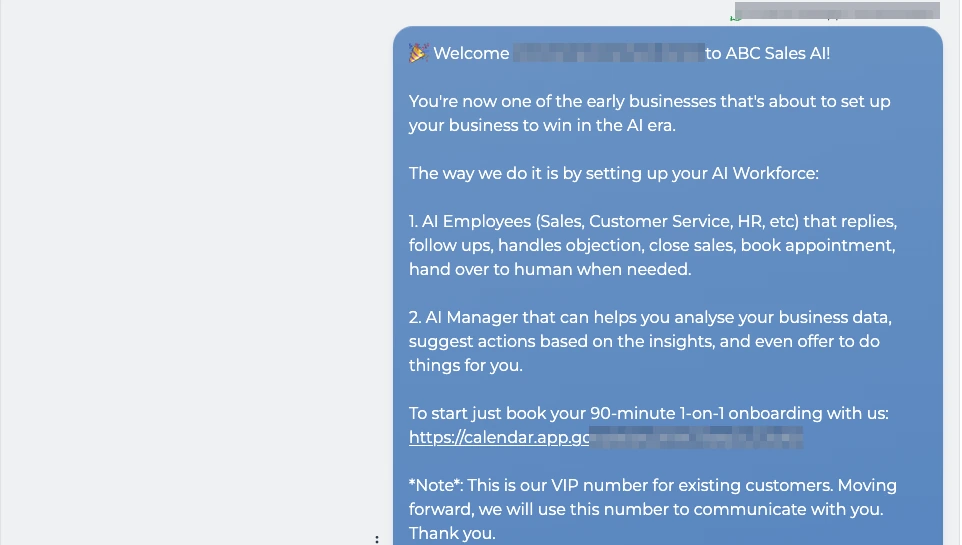
ABC inbox: the AI welcomes a new customer, explains the setup in two parts and shares the link to book a 90-minute onboarding session
A link to pick a time

Real screen

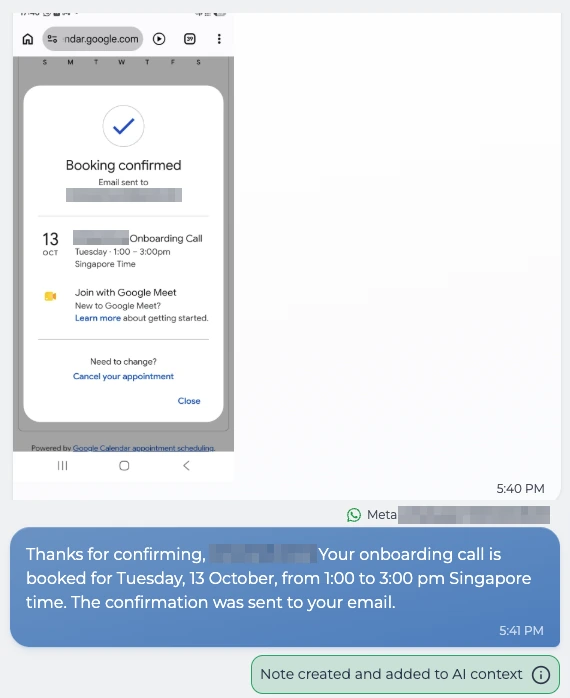
The customer's booking page shows Booking confirmed, and the AI replies in the chat that the onboarding call is booked for Tuesday, 13 October, 1pm to 3pm
The AI acknowledges the booking

Real screen

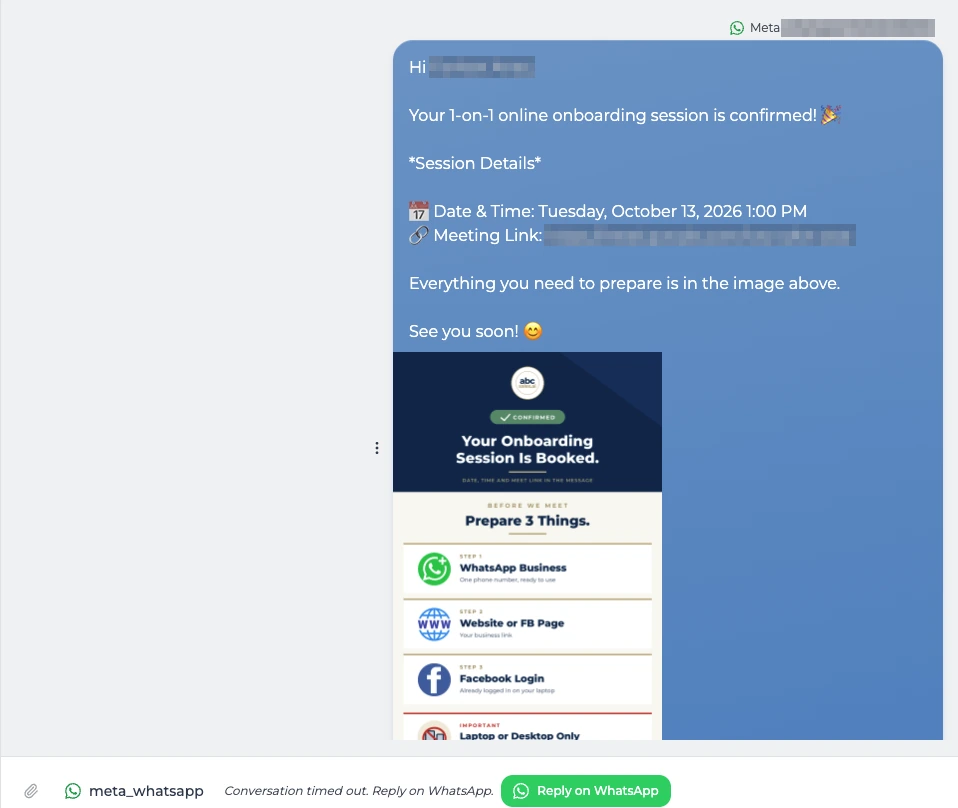
Confirmation message with the session date, time and meeting link, plus an image listing the three things to prepare
Date, time and link in one message

Real screen

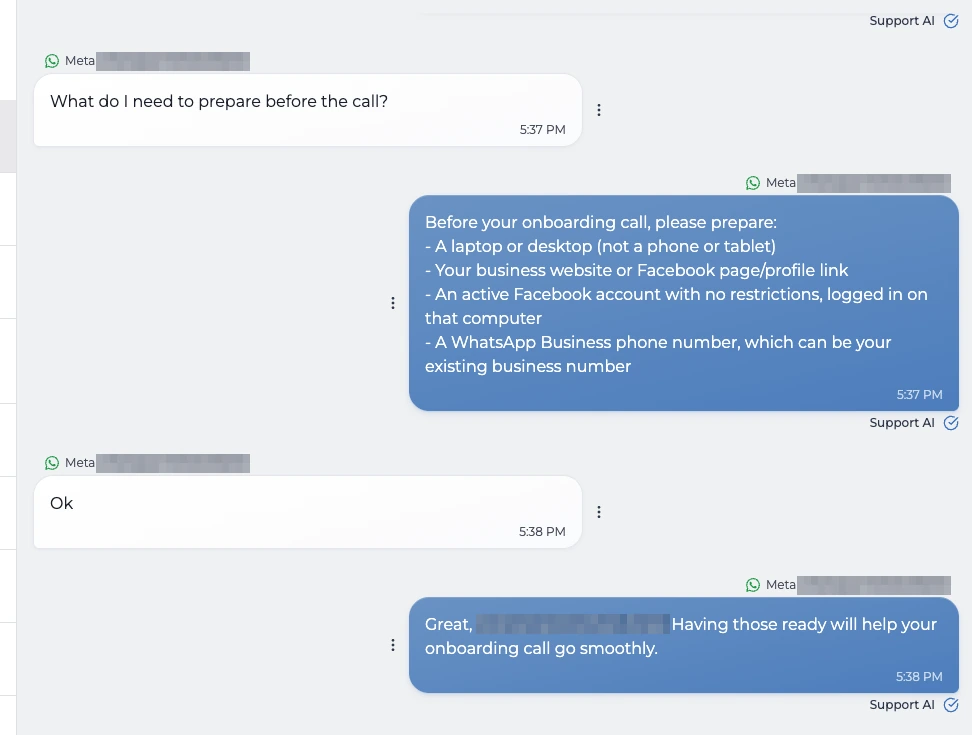
The customer asks what to prepare before the call, the AI lists a laptop, the business website, an active Facebook account and a WhatsApp Business number, and the customer replies Ok
Questions answered in the chat
See the setup behind this: Meet every new customer the moment they arrive.

Where are customers missing the next step?

Start with the booking records and attendance figures.

1. Map the journey

We review where bookings come from, how attendance is recorded and where customers drop out. We agree how to calculate the show-up rate and what an attended appointment is worth to your business.

A clear starting point for measuring improvement.
02Chapter

Give them a reason to show up.

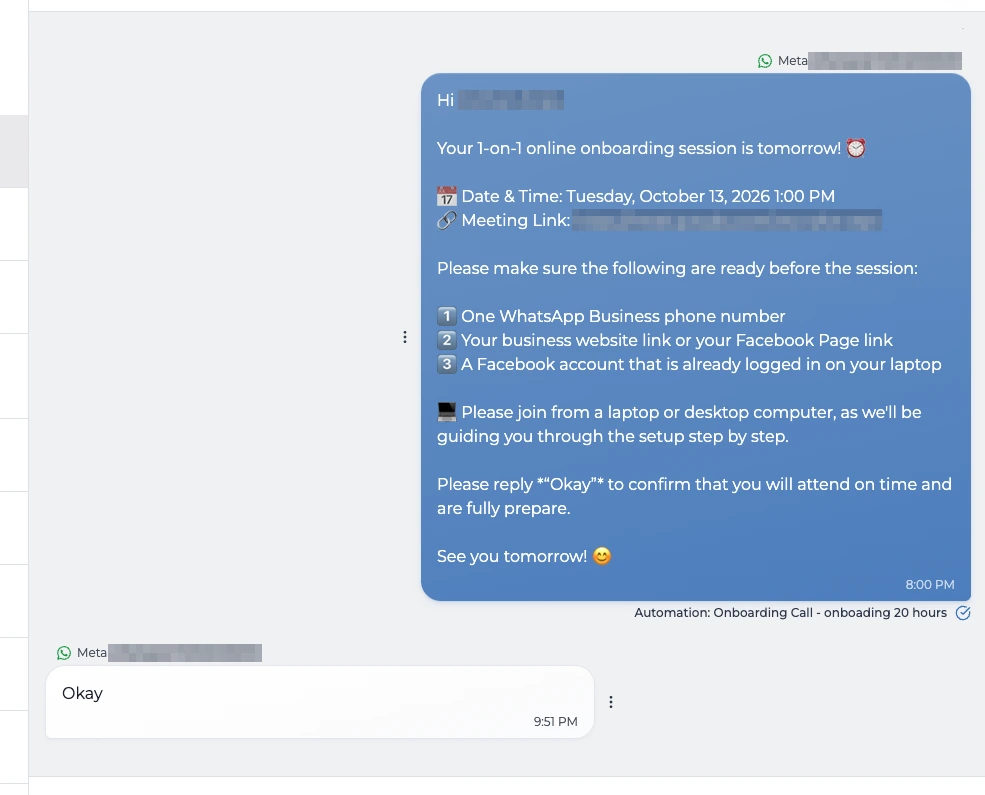
The day before, the AI sends the time and link again, lists what to have ready and asks the customer to reply Okay. A reply means they have seen it and plan to come. An hour before the visit, the AI sends a final reminder with the meeting link and the ground rules, such as which device to use and what happens if they are late. It asks for one more reply.

  • Time and link again
  • What to have ready
  • Reply Okay
  • Clear ground rules

Fewer forget, feel unprepared or quietly drop out.

The customer arrives on time and prepared, so your team's time is used well.

Real screen

Day-before reminder repeating the date, time and meeting link with a checklist to prepare, and the customer replies Okay
The customer replies Okay

Real screen

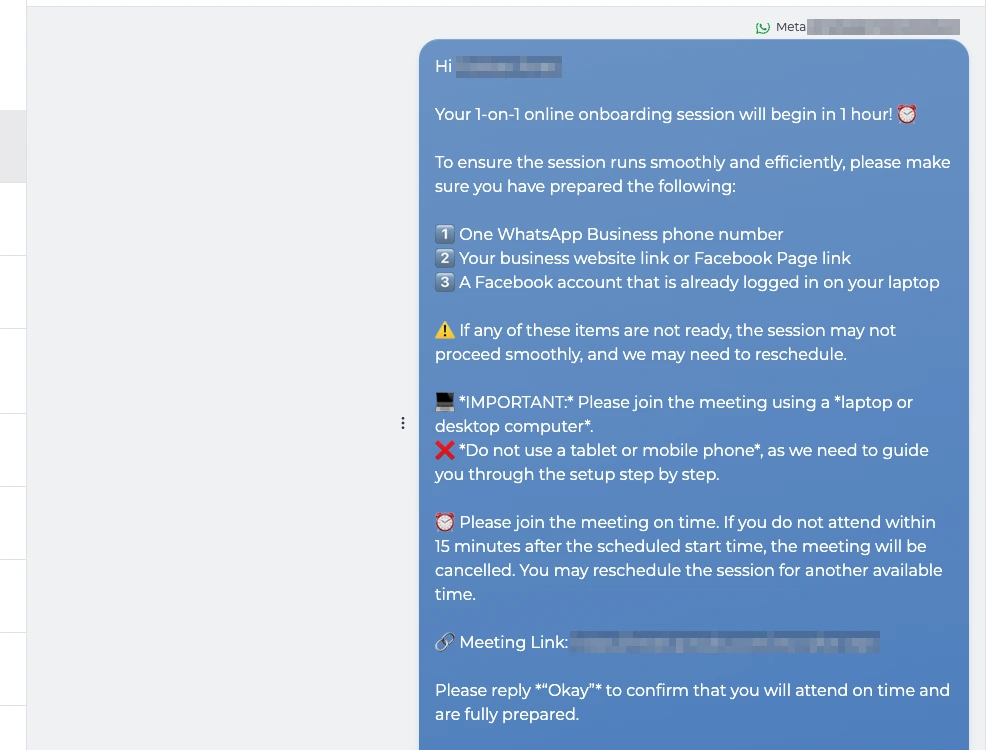
Final reminder one hour before: the checklist, join from a laptop not a phone, the session is cancelled after 15 minutes late, the meeting link and a request to reply Okay
Sent one hour before
See the setup behind this: Give them a reason to show up.

How do we make the appointment easier to remember?

Confirm the details and make changes easy.

2. Instant confirmation and smart reminders

A booking triggers a confirmation with the agreed details. Timed reminders include a way to confirm or reschedule, so the customer can tell you when plans change.

Customers have the details and a clear way to respond.

03Chapter

Plans changed? Keep the next step simple.

Timed reminders include a way to confirm or reschedule, so the customer can tell you when plans change. Once the agreed system or staff update records a no-show, a friendly message invites the customer to rebook. Your team can handle the conversations that need personal attention.

A missed visit gets a next step.

Illustration · sample data

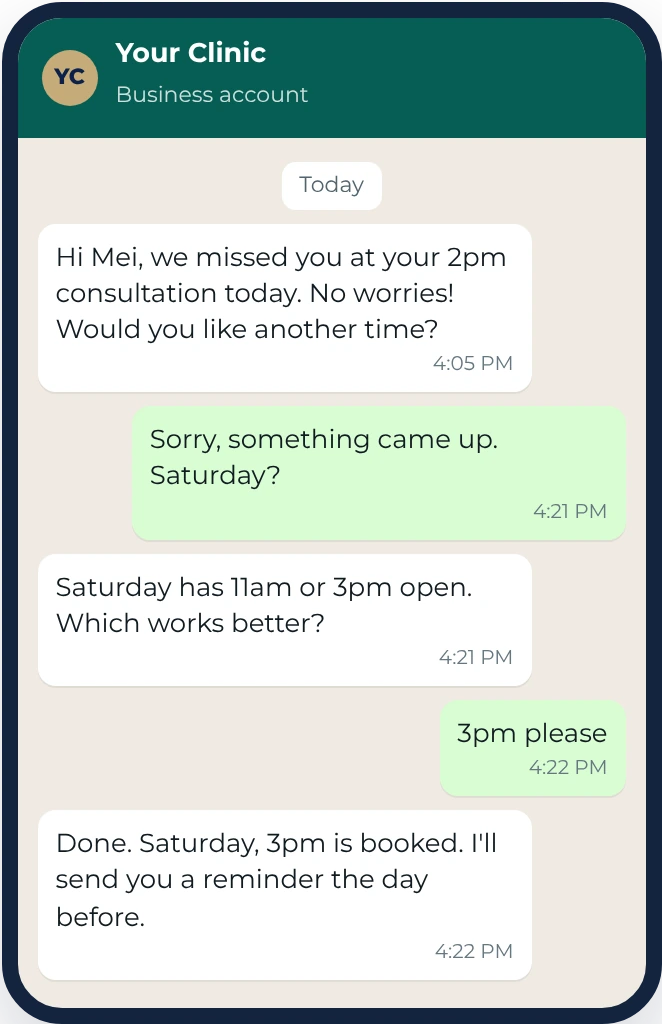
WhatsApp illustration: the business messages Mei that it missed her at her 2pm consultation and asks if she would like another time; she asks for Saturday; the AI offers 11am or 3pm; she picks 3pm and the AI confirms the booking and a reminder the day before
A missed visit gets a new time
See the setup behind this: Plans changed? Keep the next step simple.

What if the customer still misses the appointment?

Offer another time while the visit is still recent.

3. Same-day rebooking

Once the agreed system or staff update records a no-show, a friendly message invites the customer to rebook. Your team can handle the conversations that need personal attention.

A missed visit gets a next step.

04Chapter

Start the visit already understanding the customer.

Give the person meeting them a short brief with the questions, concerns and details already discussed. Record what changes during the visit so the follow-up stays relevant.

Your team spends the appointment helping the customer, instead of asking everything again.

Sample data

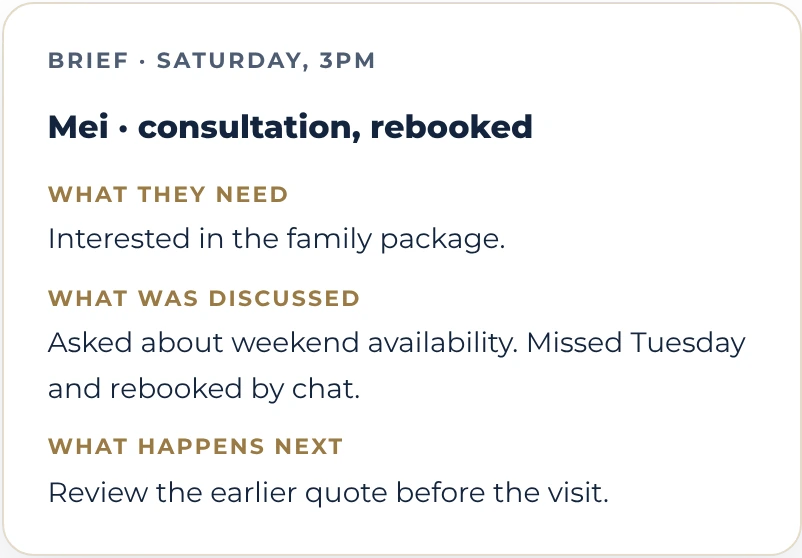
Sample brief for Saturday, 3pm: Mei, consultation, rebooked. She is interested in the family package, asked about weekend availability, missed Tuesday and rebooked by chat. Next: review the earlier quote before the visit.
Ready for the appointment
See the setup behind this: Start the visit already understanding the customer.

How does the person receiving the customer know what was discussed?

Keep the chat context available for the appointment.

4. Hand-over notes

Before the appointment, call or delivery, the person handling it gets a short brief covering the questions, concerns and quoted details already recorded.

After the session, the team records relevant updates for the next follow-up.

The next conversation can build on what the customer has already shared.

Illustrative example

From the first message to the reminder.

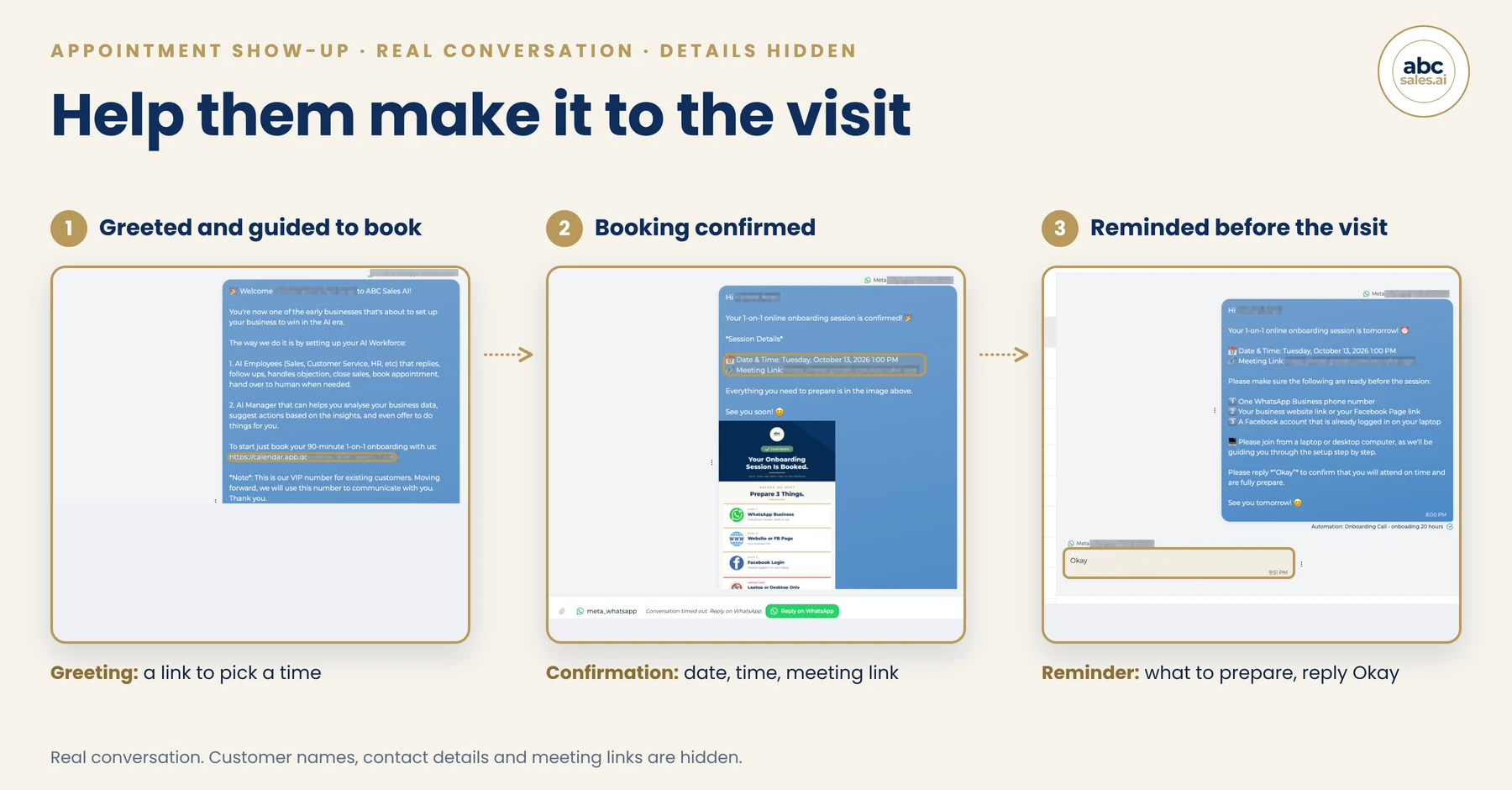
The same conversation, in three moments. Real screens from our own onboarding flow, with customer details hidden. An example of the setup, not a customer result.

The greeting
The customer is welcomed and given a link to choose a time.
The confirmation
The date, time and meeting link arrive as soon as they book.
The reminders
A day before and an hour before, each asking for a reply.

The greeting, confirmation and reminders follow the same appointment.

Real screens

Three real ABC inbox screens side by side: greeted and guided to book with a calendar link, booking confirmed with date, time and meeting link, and reminded the day before with the customer replying Okay

Built around your bookings, your team and your tone.

We map the agreed records and rules, write the messages, test the flow and review the results with you. Useful parts of your existing setup stay in place.

What you get

  • A greeting that guides customers to book
  • Confirmations and reminders linked to real bookings
  • Rebooking and staff handover included in the flow
  • Show-up reporting and first-month tuning

What we need from you

a 30-minute kickoff, how bookings come in today, and message approvals.

Timeline:

1 to 2 weeks from kickoff.

Not included:

paid ads, and changes to your booking tool beyond what connects to us. Not included on any system: WhatsApp, LINE or other messaging fees and credits, ad spend and ad management, and your other apps' subscriptions or API fees.

What is included
  • A greeting for every new customer that explains what happens next and shares the way to book
  • Your booking records mapped to branches, staff, appointment types and reminder rules, then tested with real booking scenarios
  • The confirmation the moment they book, repeating the date, time and place
  • The reminder the day before, with one question: are you still coming? And one tap to move it, in two versions, and the better one stays
  • A final reminder one hour before, with the link and the ground rules
  • Same-day follow-up after a recorded no-show, with a message and a simple way to rebook
  • The brief to your person before every appointment: who they are, what they asked, what they want
  • Expert optimisation: we watch your show rate every week for the first month and tune the timing and the wording
  • All messages in your voice, testing, and the report: your show rate, before and after

What you get

  • A greeting that guides new customers to book
  • Confirmations and reminders triggered by real booking records
  • A clear way for customers to confirm or reschedule
  • A customer brief for the person handling the appointment
  • Two reminder versions tested, with timing and wording reviewed
  • A report of your recorded show-up rate

By yourself

You can build this yourself: connect the booking records, write the messages, set the timing and rebooking rules, test the flow and review the results.

With us

Join a 30-minute kickoff, show us how bookings come in and approve the messages.

How we deliver it

Every install is the deployment of an AI system into your business, delivered as a service. In the categories IRAS uses for qualifying AI business services, the work is:

Consultancy and strategy
The business expert work above: the mapping, the definitions, the copy and the working sessions.
System development
The AI and system configuration above: the AI Employee, AI Manager and platform capability switched on and wired to your business.
Data and analytics
The data mapping and checks, plus any reports, briefs or alerts included in the agreed scope.
System-related training
Handover and training so your team runs it without us.
Already on ABC Sales AI?

Guided Launch set up one workflow with you, a first version built to get your first win, so what you already have depends on the one you chose. Typically:

Onboarding gave you

booking in chat, a reminder or a Google Calendar connection, depending on the workflow you launched. We check what is already working before adding anything.

This adds

The missing parts of your appointment flow: booking-data mapping, confirmations and reminders, same-day rebooking messages, staff briefs and a month of tuning. Existing working parts are reused.

Agree the work before you decide.

Your consultant agrees the outcomes, scope and delivery checks with you, explains the investment, and provides a quote for your business.

Compare the setup and ongoing cost with the value of additional attended appointments, using your own figures.

Book a free strategy call

Runs on your ABC Sales AI platform subscription. If you came through Guided Launch, you already have it.

We review your booking tools, POS, payment system and customer records during discovery. Your proposal identifies the connections we can build, the access they need and how we will test the agreed workflow.

We are a Singapore company. Can we claim this under the EIS 400% AI tax deduction?

Singapore company? Install work like this is generally the kind of AI spend the EIS 400% deduction covers for YA2027 and YA2028: up to about 51 cents of extra tax saving per dollar over a normal deduction, at the 17% headline rate. No pre-approval: when the work is completed and accepted we send the claim documents, and your accountant adds it to your normal return. Forward our accountant page, and confirm your own eligibility with your tax advisor.

Built, then tuned until it really works

We build everything on this page, and we keep tuning it through the support period in your quote until it is really working. We do not promise how far your numbers move.

Our commitment and what you keep

Whether the numbers move depends on your customers, your season and your list as much as on the system, so we do not promise a result, and we do not switch it on and leave. We build everything on this page, connect it to your tools as far as they allow, test it on your real conversations, and keep tweaking the messages, the timing and the rules through the support period in your quote until it is really working. We need your feedback along the way, because what a good result looks like is different for every owner. The scope is what is written on this page. The decisions that are yours stay yours: the offer, the prices, the rules. We bring the expertise, surface the options and build. You decide. Everything we build stays yours:

  • Your real show rate, measured for the first time
  • Every confirmation, reminder and rescue message, in your voice
  • The live automation: confirm, remind, rescue, brief
  • The report of every appointment saved

Whatever your market does, you keep everything on this list, and we keep working with you through the agreed support period until the system is doing what this page says.

Honest fit check

Perfect for:

  • Clinics, salons, studios, consultants, showrooms, agencies: any business that runs on appointments
  • Any business where a booking is made in chat and someone has to turn up
  • Teams who prepare for people who never arrive

Not built for:

  • Businesses without appointments or bookings. Use the catalogue to find the flow that matches how your customers buy.

Quick answers

Will reminders annoy people?

We agree the timing and wording with you. Messages confirm useful details and make it easy to respond or reschedule.

I already use a booking tool.

We check the available connection with you before confirming the setup, and reuse the parts that already work.

We send quotes rather than take appointments.

We can discuss a quotation flow with confirmation, scheduled reminders and a brief for your salesperson. The B2B Quotation and Follow-Up System explains that scope in more detail.

We are a Singapore company. Can we claim this under the EIS 400% AI tax deduction?

Often, yes. For YA2027 and YA2028 the EIS gives a 400% tax deduction on up to S$50,000 of qualifying AI spend per year of assessment. IRAS's examples of qualifying AI business services include system development, consultancy and strategy, data and analytics, and system-related training. At the 17% headline rate that is up to about 51 cents of extra tax saving per dollar compared with a normal deduction; your actual saving depends on your tax position. Grant-funded amounts and non-AI items such as messaging fees do not qualify, and mixed packages are split. There is no application and no pre-approval: you claim it in the tax return you already file. Our part is to make it effortless. When the install is completed and accepted, we send the necessary documentation, itemised under this system's title, and we work with your accountant on anything else the claim needs from our side. Whether your company qualifies depends on your own situation, so confirm with your tax advisor.

ABC Sales AI · abcsales.ai · Every install is scoped to your business and quoted by your consultant. Outcomes depend on your market, offer and execution; what we commit to is the work, not the result. You are responsible for the content you send; campaigns are vetted against your industry's rules before launch. ABC Sales AI is not a tax advisor; any Singapore EIS treatment is for your tax advisor and IRAS to confirm.

Where do your booked appointments get stuck?

Show us how customers book today. We will check the available connection and identify the reminders, rebooking steps or staff notes that need work.

Book a free strategy callOr talk to a consultant on WhatsApp