
WhatsApp Error 131042: Business Eligibility Payment Issue
Error 131042 is a Meta billing problem. Template messages stop sending because your WhatsApp Business Account's billing is not settled or no valid payment method is set as Default.
- Symptom: WhatsApp / Meta Business shows a business eligibility issue and template messages fail to send.
- Likely cause: Billing is not settled, or a valid payment method is not set as Default.
Quick Fix Checklist
- Open https://www.salesbotsecrets.com/wa.
- Go to Payment settings.
- Confirm past bills are settled (no outstanding balance).
- Confirm a card is added and set as Default.
How to Verify in Meta Billing
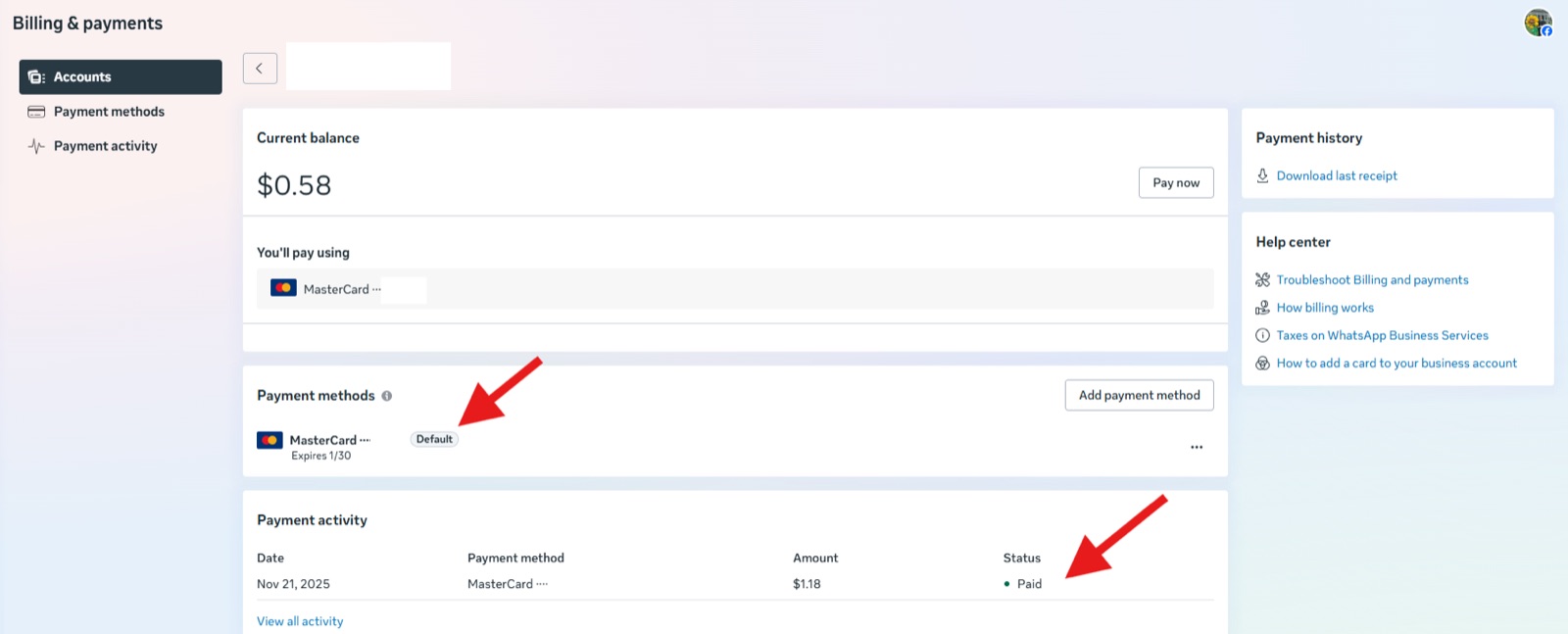
Meta Billing & payments page showing current balance, payment methods, and payment activity
In Billing & payments:
- Check Current balance is paid.
- Under Payment methods, ensure one card is marked Default.
- Under Payment activity, confirm the latest charge status is Paid.
Additional Billing Checks (Meta)
Reference: About Billing For Your WhatsApp Business Account
Common problems to verify:
- Payment account is not attached to a WhatsApp Business Account.
- Credit line is over the limit.
- Credit line (Payment Account) is not set or active.
- WhatsApp Business Account is deleted.
- WhatsApp Business Account is suspended.
- Timezone is not set.
- Currency is not set.
- MessagingFor request (On Behalf Of) is pending or declined.
If You Cannot Pay the Bill or Set a Card as Default
- Try a different card.
- If multiple cards fail, call the bank and request enabling recurring, online subscription, or international e-commerce payments (the wording depends on the bank).
- After the bank confirms, retry the payment and set the card as default.
💡
Most stubborn 131042 cases come down to a bank blocking international recurring charges. One phone call to enable them usually fixes it.
When to Escalate
Escalate if:
- Billing shows paid and a default card is set, but eligibility remains blocked for more than a few hours.
- Payment status is stuck as pending or fails repeatedly with no clear bank reason.
What to Collect Before Escalating
- Screenshot of the Billing & payments page showing: current balance, default card, and latest payment activity status.
- Any payment error message shown by Meta.
- Business Manager / WABA identifiers (if available).