
Meta WhatsApp Coexistence: The Complete Guide
Use WhatsApp Business API alongside the WhatsApp Business App. Keep your mobile app active while powering AI automation!
Meta WhatsApp Coexistence: The Complete Guide
Meta WhatsApp Coexistence: The Complete Guide
Welcome to the future of WhatsApp communication for your business! The Meta WhatsApp Coexistence feature is a cutting-edge integration that combines the power and scalability of the WhatsApp Business API with the convenience and familiarity of the WhatsApp Business App.
Understanding Your WhatsApp Options
Before you begin, it's helpful to understand the different types of WhatsApp and where Coexistence fits in.
> Note: Coexistence does not extend the API 24-hour messaging window and has regional restrictions.
1. The Problem: The Old Way of Using WhatsApp API
The Old Challenges
- **The 24-Hour Reply Window**: You were forced to use pre-approved templates if you wanted to reply to a customer after 24 hours.
- **Loss of the Business App**: Switching to API-only meant giving up the convenience of replying on your phone with the WhatsApp Business App.
- **No Voice Calling**: With the API-only setup, you couldn't make voice calls to customers.
2. The Solution: Introducing WhatsApp Coexistence
Coexistence connects your number to the powerful ABC Sales AI API while keeping your mobile Business App active. This means no more choosing between convenience and power!
Key Benefits
- **Automate & Scale with the API**: Use AI chatbots and integrations in ABC Sales AI to handle conversations efficiently
- **Keep Your Contacts & History**: Your existing phone contacts and up to 6 months of chat history get imported automatically
- **Bypass the 24-Hour Window**: Jump into conversations anytime using your phone for a personal touch
- **Make Voice Calls Again**: Make and receive voice calls directly from your Business App
3. Key Considerations & Limitations
- **Messaging Speed Cap**: All messages are limited to approximately 5 messages per second
- **Some Features Disabled**: Message editing, disappearing messages, and view-once messages are disabled
- **No Group or Broadcast Sync**: Group chats and broadcast lists from your phone will not sync
- **Risk Awareness**: Start with a new, "warmed-up" number instead of your main business line
- **Number Eligibility**: Your phone number must have sufficient activity on the WhatsApp Business App before connecting
4. How to Set Up
Step 1: Access Messaging Channels
1. Go to **Messaging Channels** in ABC Sales AI
2. Click **Add Messaging Channel**
3. Select **WhatsApp Coexistence**
Step 2: Connect Your Number
4. Follow the step-by-step onboarding process
5. Enter your WhatsApp Business phone number
6. Complete the Facebook Business verification
Step 3: Sync Your Data
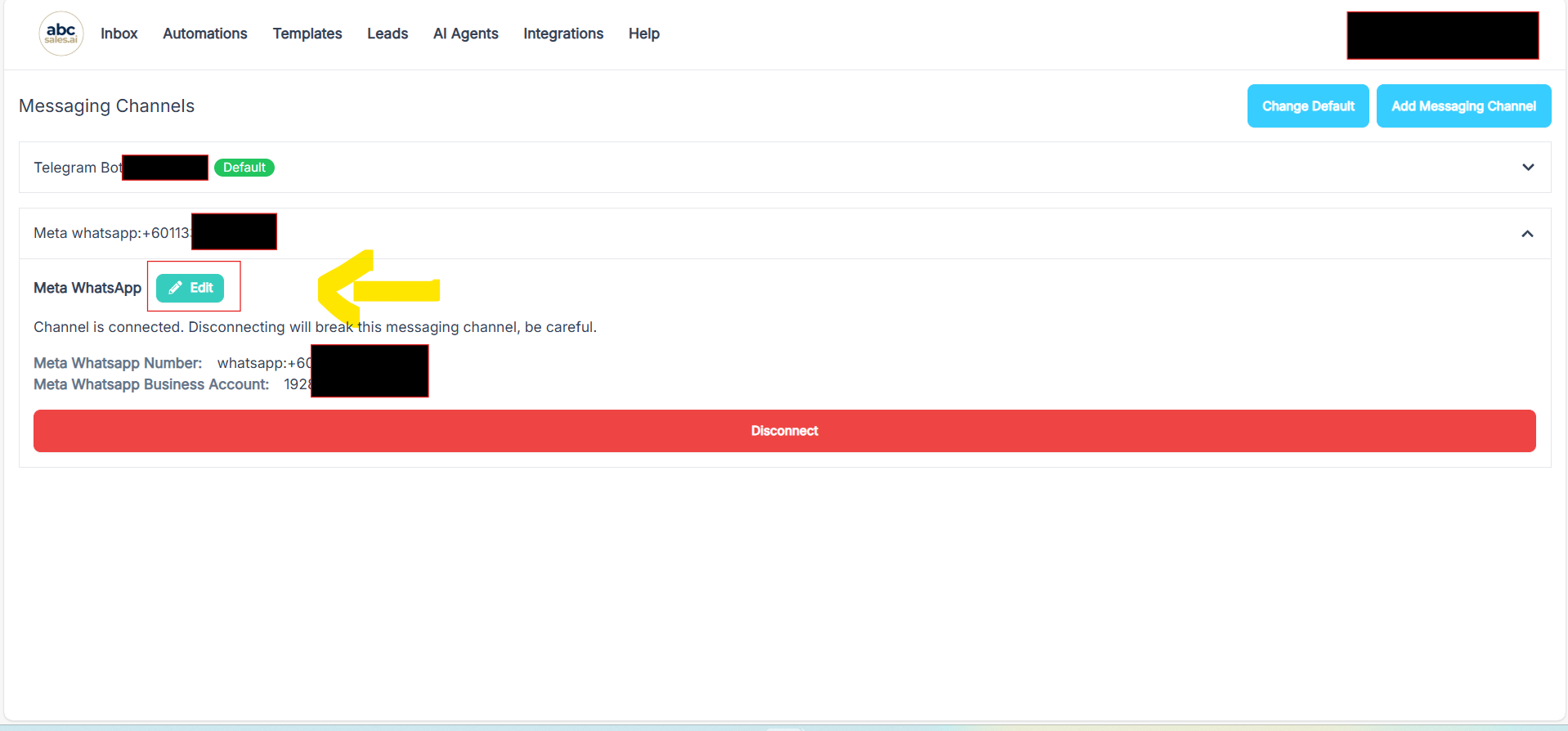
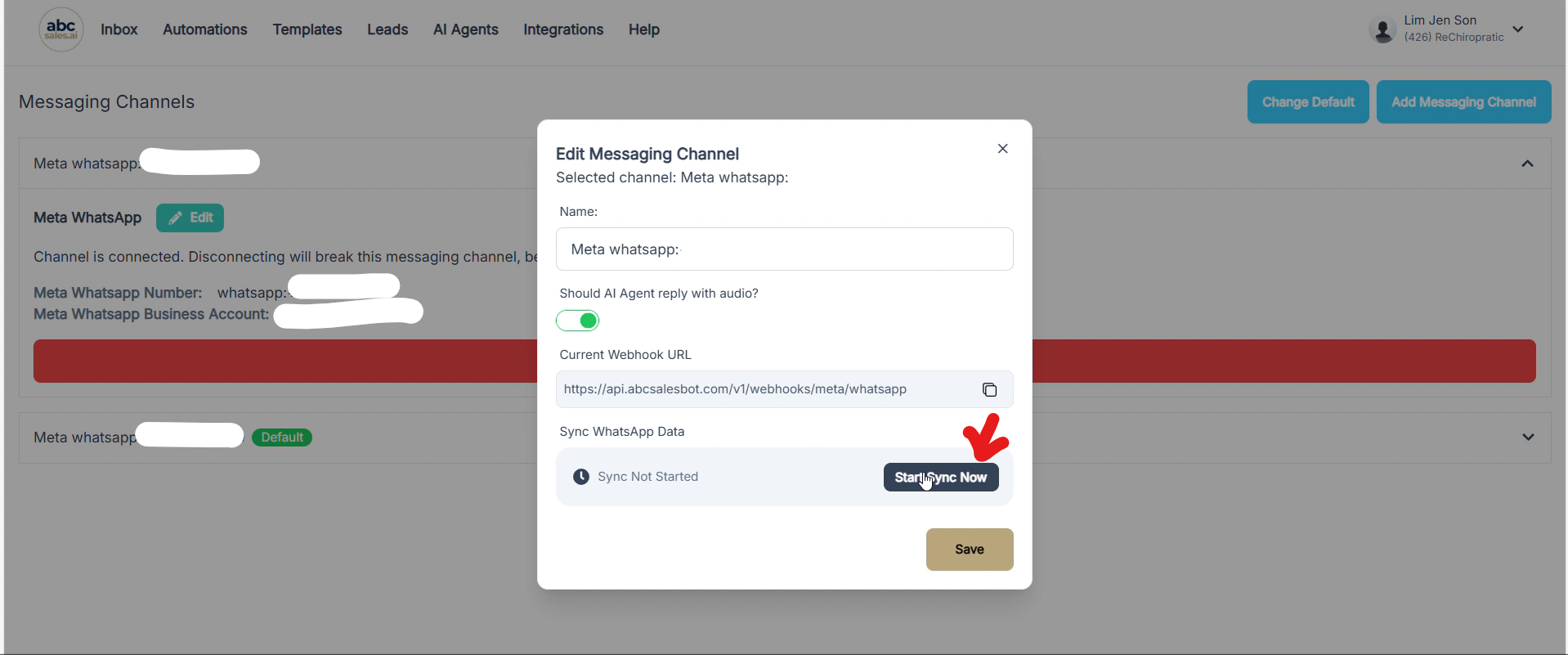
7. Click the **Edit** button next to your connected channel
8. Click **Start Sync Now** to import your chat history
9. Wait for the sync to complete (may take a few minutes)
5. Troubleshooting
"Phone number isn't eligible" Error
If you see this error during setup, your phone number needs more activity on the WhatsApp Business App before it can connect to the API. Use the number actively for a few weeks before trying again.
"Error updating phone number details"
This usually means a temporary connection issue. Try again in a few minutes, or contact support if the issue persists.
What Happens After Setup?
Once connected, you'll see your conversations sync in the ABC Sales AI inbox. The AI will respond automatically based on your system prompt, and you can still reply manually from your phone!