
Using Zoom with ABC Sales AI
ABC Sales AI supports a Zoom connection where this feature is enabled for your account. After you connect Zoom, AI Manager can help with customer-authorized Zoom workflows, such as creating Zoom meetings or webinars, finding upcoming meeting or webinar links, retrieving meeting or webinar details, reading registrant or participant information where required, and accessing cloud recording information where enabled.
Connecting Zoom
- Sign in to ABC Sales AI.
- Go to the AI Manager or integrations area where Zoom is available.
- Select Zoom and click Connect.
- You will be redirected to Zoom to authorize the connection.
- Review the requested access and click Allow.
- After authorization, you will be redirected back to ABC Sales AI.
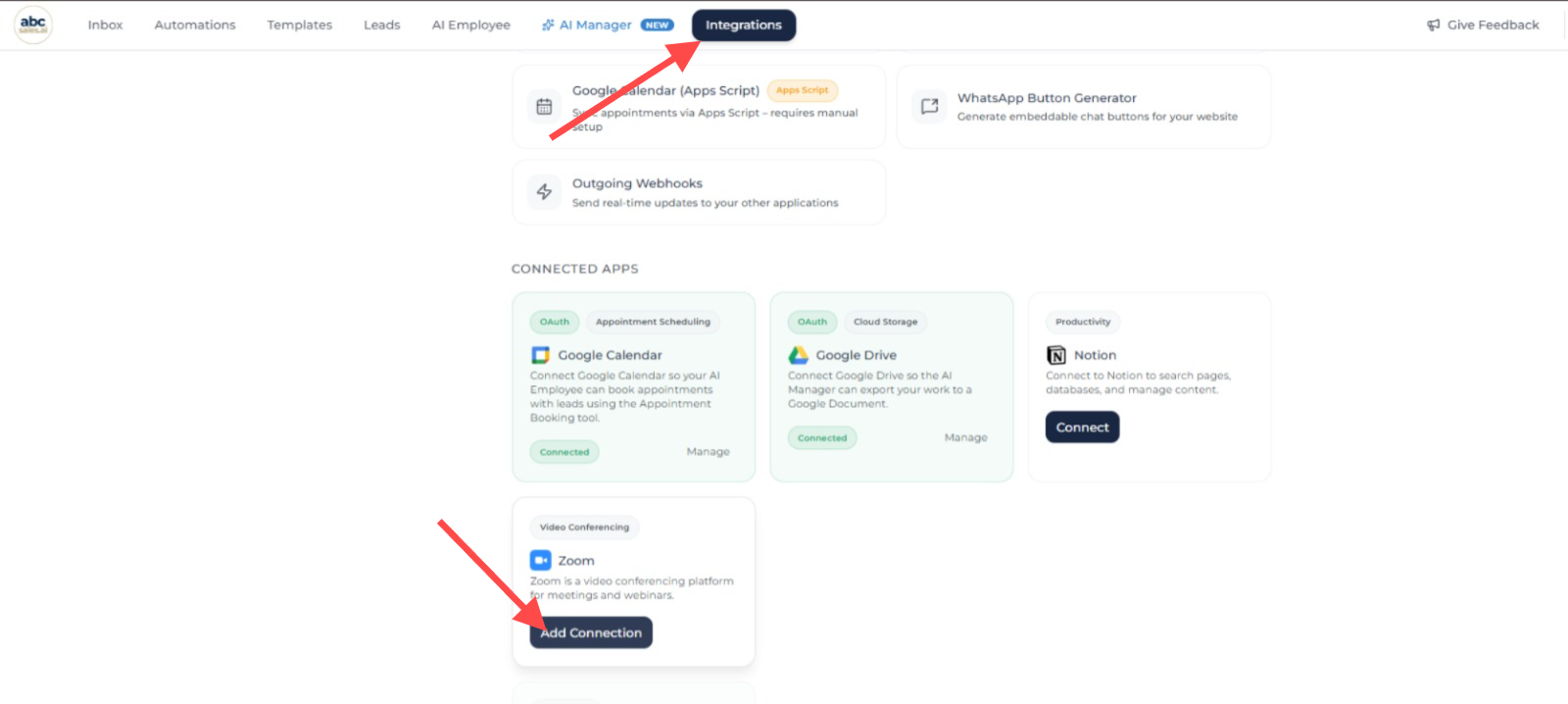
Integrations page showing where to connect Zoom in ABC Sales AI
Once connected, AI Manager can use the Zoom features available for your account.
What ABC Sales AI Can Do With Zoom
Depending on the access granted and features enabled for your account, ABC Sales AI may use Zoom to:
- create Zoom meetings or webinars;
- find upcoming Zoom meetings or webinars;
- retrieve meeting or webinar details;
- access invite links or registration links;
- read registrant or participant information where required;
- access cloud recording metadata, transcripts, or chat files where enabled;
- support AI Manager analysis, summaries, follow-up workflows, lead scoring, and customer-authorized automations.
ABC Sales AI only uses Zoom data to provide user-facing features requested by the customer.
What Zoom Access We Ask For
ABC Sales AI only asks for the Zoom access needed for the features enabled on your account. Depending on what you use, this may include access to create or read meetings and webinars, find upcoming meetings and webinars, read registrant or participant details where needed, read cloud recording information where enabled, and identify the connected Zoom user.
Reconnecting Zoom
From time to time, ABC Sales AI may update the Zoom connection to support new features or meet Zoom requirements. When this happens, you may be asked to reconnect Zoom and approve the updated access.
If your Zoom connection needs to be reconnected, some Zoom features may stop working until you reconnect. Your existing Zoom meetings, webinars, and recordings will not be deleted by disconnecting or reconnecting ABC Sales AI.
Disconnecting Zoom
You can disconnect Zoom from ABC Sales AI by removing the Zoom connection in your ABC Sales AI Integrations or AI Manager settings where supported.
You may also revoke ABC Sales AI's access from your Zoom account settings:
- Sign in to Zoom.
- Go to the Zoom App Marketplace.
- Open Manage > Added Apps.
- Find ABC Sales AI.
- Remove or uninstall the app.
After Zoom access is revoked, ABC Sales AI will no longer be able to access Zoom data through that connection. Zoom-related features in ABC Sales AI will stop working until Zoom is connected again.
Data Handling
ABC Sales AI does not sell Zoom user data. ABC Sales AI does not use Zoom user data for advertising, retargeting, or training generalized AI or machine learning models.
Zoom user data may be processed by third-party service providers, including AI or machine learning providers, only where necessary to provide the user-facing features you request, support the service, maintain security, comply with applicable law, or perform customer-authorized workflows.
For more information, please see our Privacy Policy and Terms of Use.
Support
If you need help connecting, using, reconnecting, or removing the Zoom connection, contact ABC Sales AI support: