
Merge Duplicate Leads
ABC Sales AI normally helps prevent duplicate leads during import.
When you import leads, the system checks identifiers such as the phone number. If an imported lead matches an existing lead, ABC Sales AI updates that existing lead instead of creating another one.
This is deduplication. It is different from manually merging duplicate leads that already exist in your account.
When to Use Merge Leads
Use Merge Leads when duplicate lead records already exist, for example:
- Older duplicate records were created before your current import setup.
- A phone number was saved in a different format before.
- A past import or manual entry created more than one lead for the same person.
Before You Merge
Manual merge works for selected leads with the same phone number.
The oldest lead is kept. Related data from the other selected lead records is moved to that oldest lead.
This can include:
- Conversations
- Tags
- Automation subscriptions
- Scheduled messages
- Related lead data
> Important: Merging leads cannot be undone easily. Check that the selected leads are really duplicates before saving.
How to Merge Duplicate Leads
- Go to Leads.
- Select the duplicate leads you want to merge.
- Open Bulk Operations.
- Choose Merge Leads.
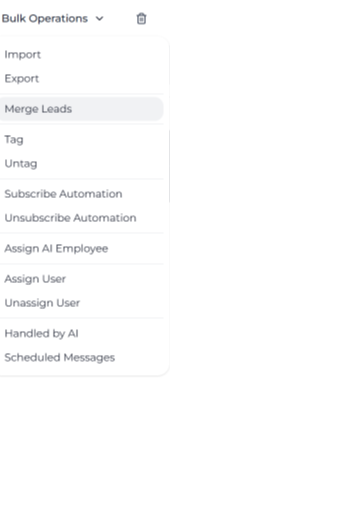
Merge Leads option in the Bulk Operations menu on the Leads page
- Review the confirmation message.
- Click Save to merge the selected leads.
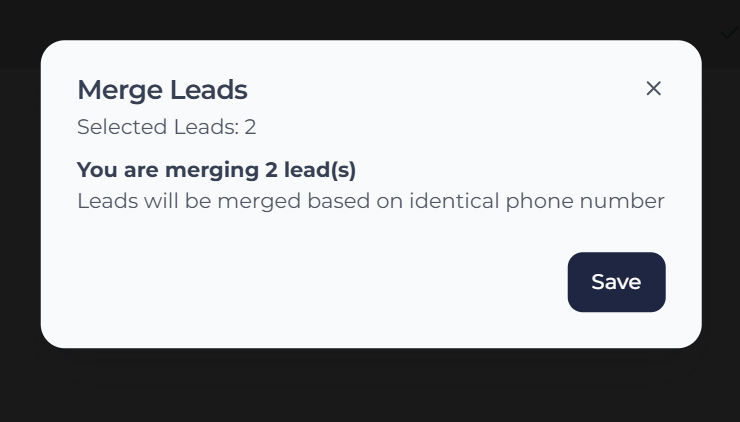
Merge Leads confirmation dialog showing two selected leads
What Happens After Merging
After the merge:
- The oldest lead remains.
- The duplicate lead records are merged into that lead.
- Conversations and related activity stay available under the surviving lead.
- Tags, automation subscriptions and scheduled messages are transferred where applicable.
You can then continue working from the surviving lead record.
Why Duplicates May Still Happen
Automatic deduplication depends on matching identifiers such as phone numbers.
Duplicates may still happen if:
- A phone number is missing.
- A phone number is saved in a different format.
- Older records were created before the deduplication rule matched them.
- A lead was created manually with incomplete details.
To reduce future duplicates, keep phone numbers in a consistent international format with the country code.