
Auto-DM for Facebook & Instagram Comments
Social Media Comment Engagement automatically sends a private direct message (DM) to leads who comment on your Facebook or Instagram posts. You control it with simple on/off toggles, so you can capture leads automatically when you want and pause automation during high-volume moments like live events.
Social Media Comment Engagement Overview
Enable or Disable AI on Comments and Story Mentions
Why It Matters
Previously, teams had to manually:
- Open each commenter's profile
- Click Message
- Copy and paste a reply
- Repeat for every new comment
This was time-consuming and easy to miss. With this feature enabled, the system instantly starts a private conversation with the commenter, helping you respond faster, reduce missed leads, and improve conversion from post engagement.
How It Works
- A user leaves a comment on one of your Facebook or Instagram posts (common triggers like "PM" or "DM me", or any comment that signals interest)
- The system detects the comment
- The system automatically sends a private message to the commenter
Example flow: a lead comments "PM" on your post and immediately receives a DM such as "Thanks for your interest… Quick question: …". The DM content follows your existing AI and automation behavior for the connected channel.
Setup Requirement: Reconnect Your Channel
To use this feature, reconnect your Facebook Messenger channel (and Instagram channel if you use one). Existing connections made before this feature launched need to be refreshed to grant the new permissions.
Enable or Disable the Triggers
You have full control over two AI auto-engagement triggers for your Facebook Messenger and Instagram channels:
- Auto reply to post comments: ON / OFF
- Auto reply to story mentions: ON / OFF
To find the toggles:
- Open ABC Sales AI
- Go to Integrations
- Select your Messenger or Instagram channel and click it
- Switch Auto reply to story mentions and Auto reply to post comments on or off
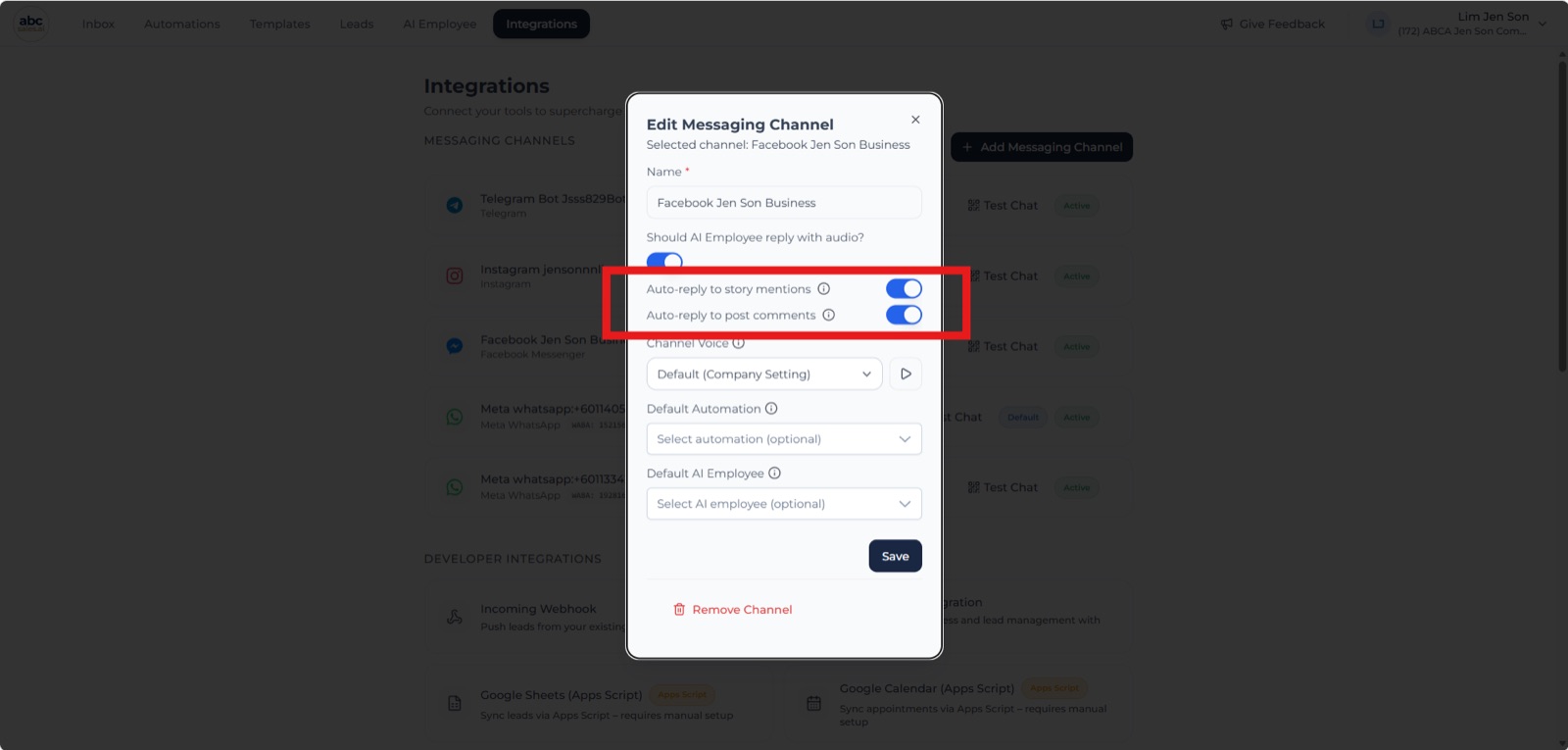
Auto reply to story mentions and post comments toggles in the channel settings
Usage Examples
- Lead capture from post comments (FB/IG): when Auto reply to post comments is ON, anyone who comments on your post automatically receives a private DM so you can continue the conversation privately
- Facebook Live comment management: during a live stream, enabling Auto reply to post comments lets your AI respond to each comment by immediately sending a DM, helping you keep up with high comment volume
- Instagram story mentions: when Auto reply to story mentions is ON, the system automatically DMs users who mention your IG account in their stories
How to Test
- Go to any post on your connected Facebook Page or Instagram account
- Leave a comment (e.g., "PM")
- Open Messenger or Instagram DMs
- Confirm you received an automatic private message from the page or account